Skip to content
RealtyLand management and sales
How it works Site plan and map Sales and collections Agreements and receipts Frequently asked questions
Coming soon toGoogle Play
Gosoft · Realty

Sell your lots right from the site plan.

Upload your subdivision's PDF site plan, mark every lot with a tap and sell it right there: client, payment plan, proposal, reservation, agreement and receipts. On your phone, at the office or on site, with or without internet.

Coming soon toGoogle Play How it works
  • Works offline
  • Never sells a lot twice
  • Español, English, Português
  • Light and dark themes
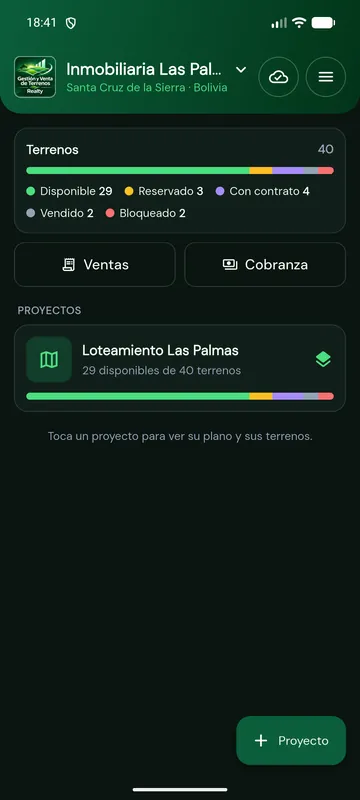
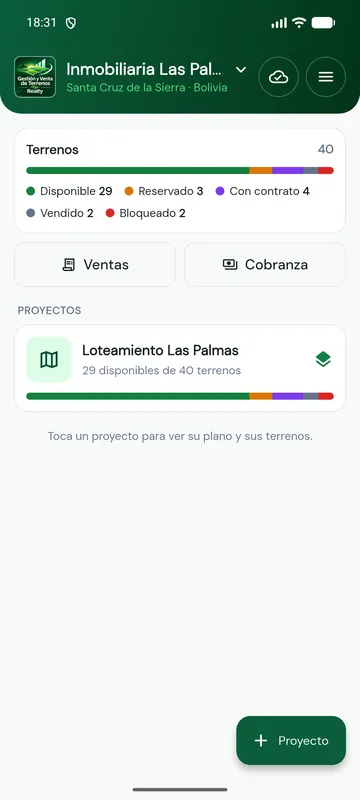
Realty home screen with the summary of lots by status
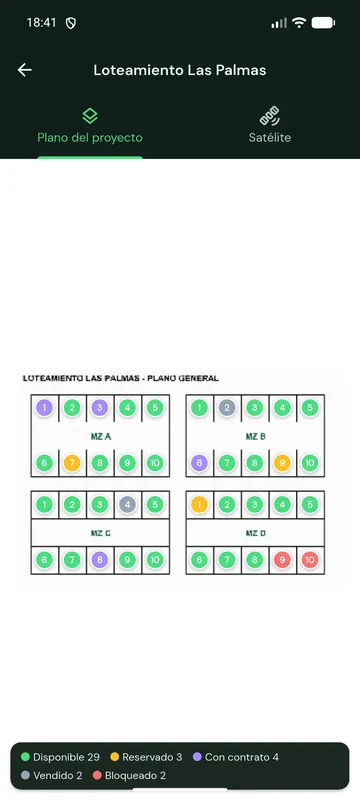
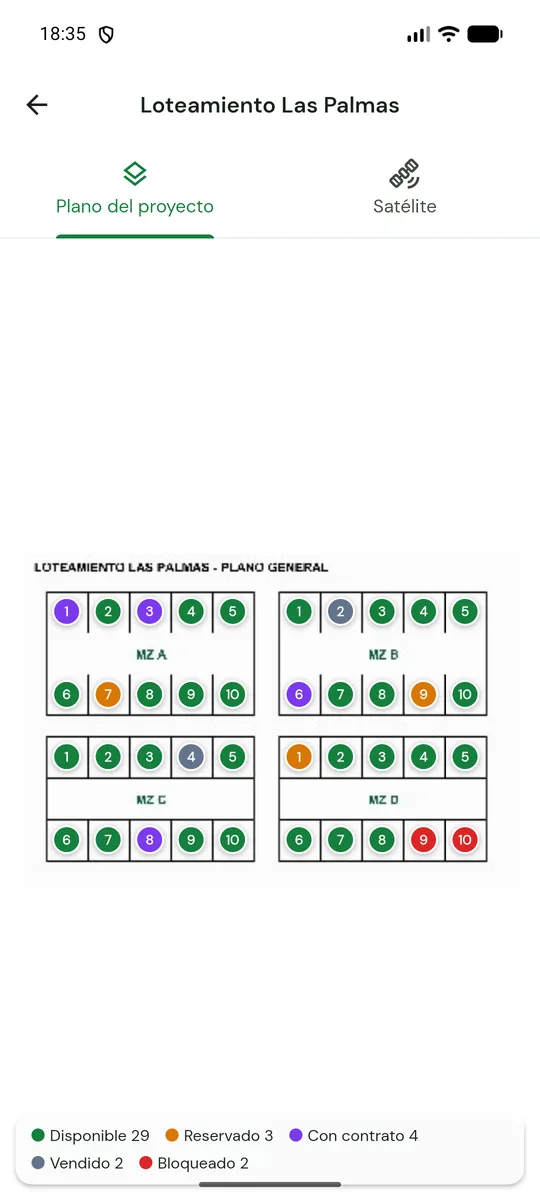
Site plan of a subdivision with every lot marked in the color of its status

The whole land sales process in a single app

  • PDF site plan
  • Satellite map
  • Lots from Excel
  • French amortization
  • Several holders
  • PDF and Word agreement
  • QR receipts
  • Collections
  • Google Drive
  • Offline
How it works

From site plan to sale in four steps

No installations, no servers of your own and no long training: if you can use WhatsApp, you can use Realty.

  1. Sign in with Google and register your company

    Logo, WhatsApp, address and currency. Your photo, birth date and mobile (taken from the SIM) go to your profile, and your Google Drive folder is created.

  2. Upload the plan and load the lots

    The subdivision PDF becomes a zoomable map. Lots are added one by one or from an Excel file, choosing which column holds each field.

  3. Tap the plan and sell

    Tap a lot, choose it from the list and it gets its marker. From there you register the client, build the payment plan and confirm the reservation.

  4. Collect and hand over documents

    Every payment with its receipt and QR. Once the down payment is paid the purchase agreement is issued; at the end, the full payment certificate.

Site plan and satellite

Your subdivision, lot by lot

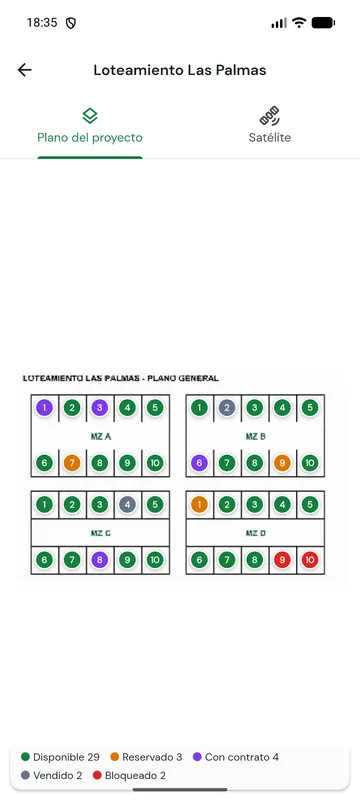
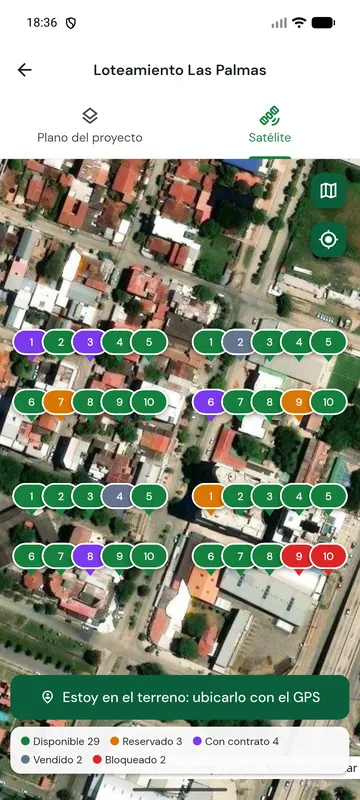
Two tabs, the same information: the project's official site plan and the satellite view of the place.

Subdivision site plan with the lots marked in colors
Project site plan

The PDF site plan, zoomable and offline

You upload the PDF (or an image) once: the same Gosoft Realty service turns it into a sharp map that works offline on every phone in your company.

  • Tap the spot on the plan and choose the lot from a list: it gets its marker.
  • Every marker shows the lot status color and updates itself when you sell or collect.
  • Tap a marker for the lot details, price and the "Sell this lot" button.
  • Move or remove it anytime; compact view when looking at the whole plan.
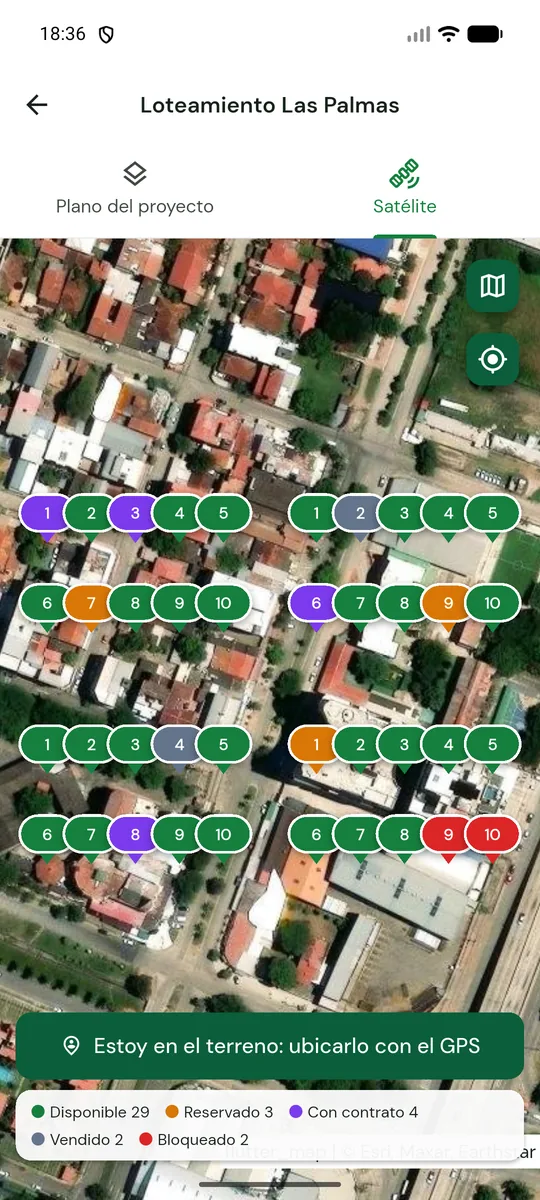
Satellite map with the project lots marked
Satellite map

Every lot on the real map

Free satellite imagery to show clients where their lot is, with the streets and landmarks of the neighborhood.

  • Place a lot by tapping the map or with GPS while standing on it.
  • Switch between satellite and street map with a tap.
  • Coordinates can also come from the Excel file.
  • Open the location in Google Maps to share it.
Statuses

A color for every lot

At a glance you know what is free, what is reserved and what is already paid. The status changes by itself with every payment.

  1. Available

    Free to sell. If a sale is reverted, the lot goes back to this status.

  2. Reserved

    Sale confirmed with its payment plan, down payment not yet fully paid.

  3. Under contract

    Reservation and down payment paid: the purchase agreement can be issued.

  4. Sold

    The whole plan is paid. The full payment certificate is enabled.

  5. Blocked

    The company took it off the market for a while (for example, under review).

Modules

What a developer needs, without overpaying

Designed for those who want something simple and affordable, with the essentials of Gosoft Realty.

Included

Projects and site plans

All your subdivisions and developments.

What it includes

  • Name, logo and location (can be added later, on site)
  • PDF or image site plan turned into a zoomable map
  • Several companies and projects in the same account
  • Summary of lots by status
Included

Lots and Excel

Neighborhood unit, block, number, area, price per m² and description.

What it includes

  • Add one by one or import an Excel (.xlsx) or CSV file
  • A list for each field to choose its column
  • Recognizes the most common headers by itself
  • An existing lot is updated, not duplicated
Included

Sales and French amortization

The payment plan builds itself and can be edited row by row.

What it includes

  • Reservation and down payment without interest
  • Annual interest and number of monthly installments
  • Dates: reservation today, down payment next month, then installments
  • Several holders in the same sale
Included

Payments and collections

Recording a payment takes seconds.

What it includes

  • Payments are applied to installments: interest first, then principal
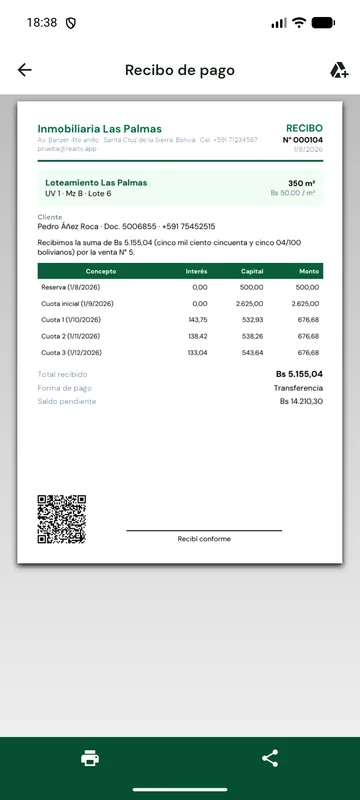
  • PDF receipt with QR and amount in words
  • Overdue installments and balance of each sale
  • Cash, transfer, QR, deposit, card or check
Included

Agreements and certificates

Documents with your company, project, lot and client data.

What it includes

  • Purchase agreement in PDF and Word
  • Clauses editable per company, with data filled in automatically
  • Full payment certificate when the plan is done
  • Revert an agreement with date and reason
Included

Attachments in Google Drive

A folder in each seller's Drive, with a subfolder per sale.

What it includes

  • Photos or PDF of the signed agreement
  • Client documents and proofs of payment
  • They upload by themselves when there is internet
  • The app only sees what it creates in your Drive
Sale form with the French amortization payment plan
Sales

Build a sale in a minute

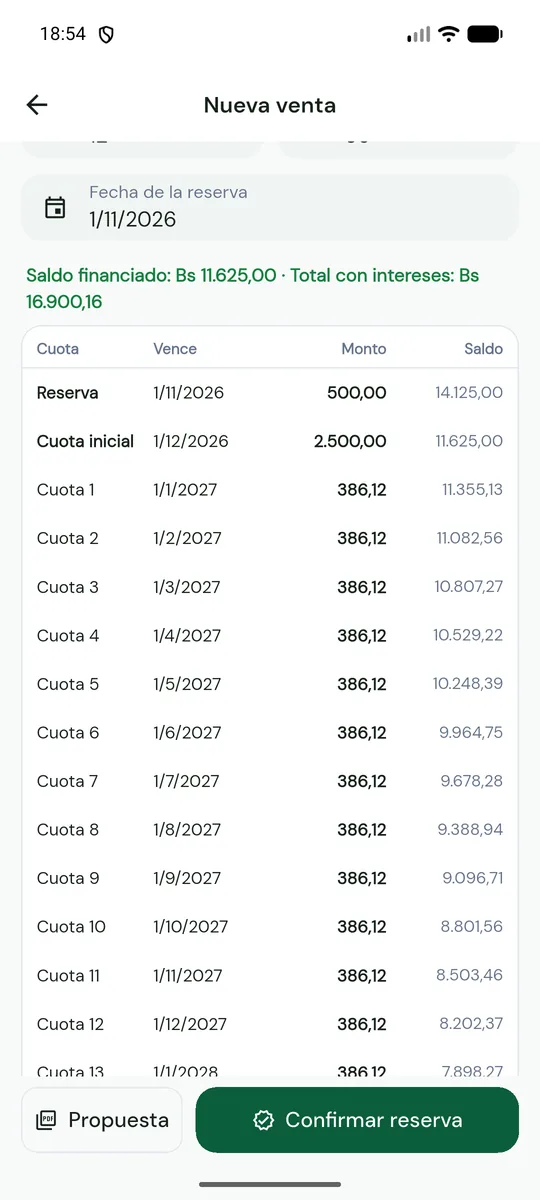
The project and lot are always on top. Add the holders, enter the reservation, down payment, interest and number of installments: the French amortization plan appears instantly.

  • Price = area × price per m², with an optional discount
  • Fixed installment; the last one closes the exact balance
  • Tap a row to change its date or amount
  • PDF proposal to send via WhatsApp, offline
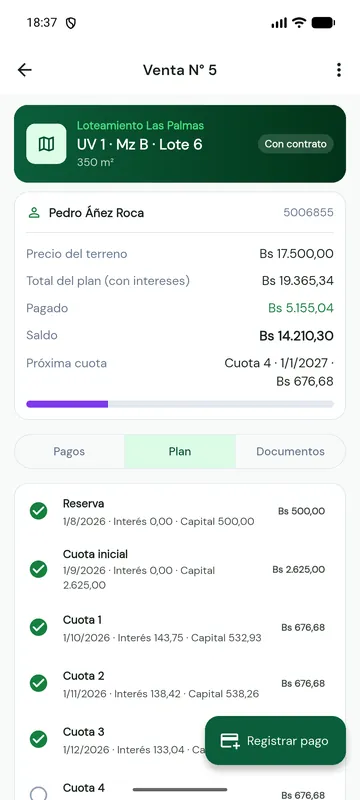
Sale detail with its payment plan and paid installments
Collections

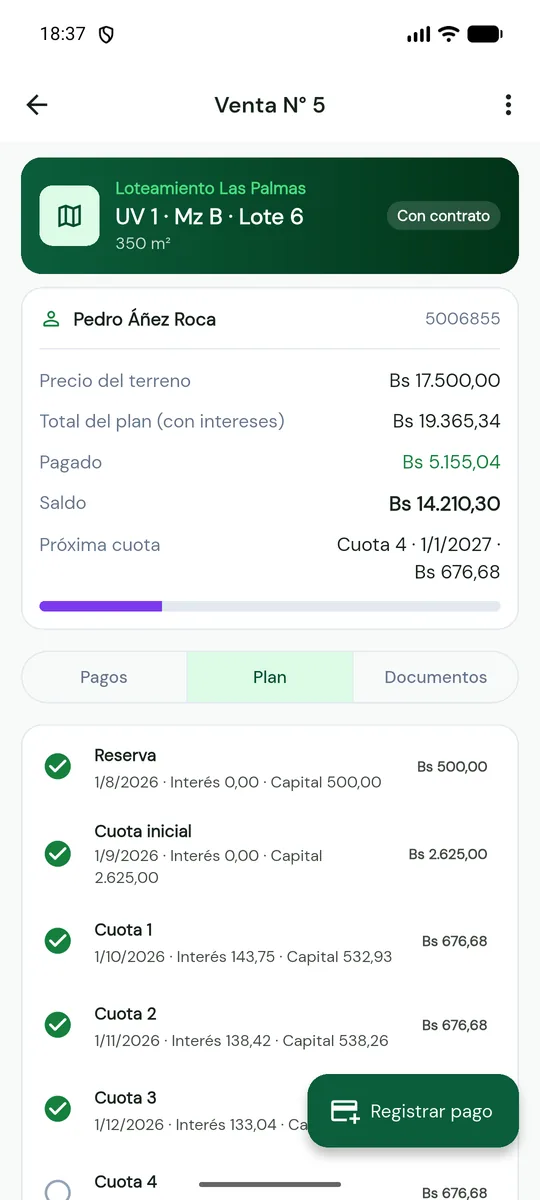
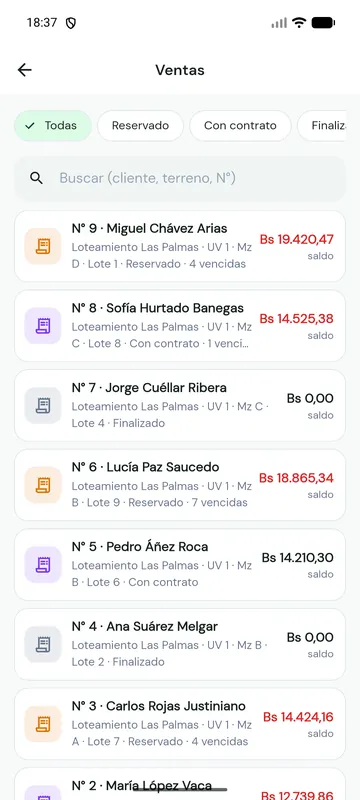
Every sale, with its plan up to date

Paid, balance, next installment and overdue installments. Each payment ticks the installments it covers and changes the lot status.

  • Collections list with overdue sales first
  • Proofs attached to each payment
  • Edit the plan of an ongoing sale
  • Revert: the agreement is kept and the lot becomes available again
Screen to import lots from Excel by choosing columns
Excel

Hundreds of lots in seconds

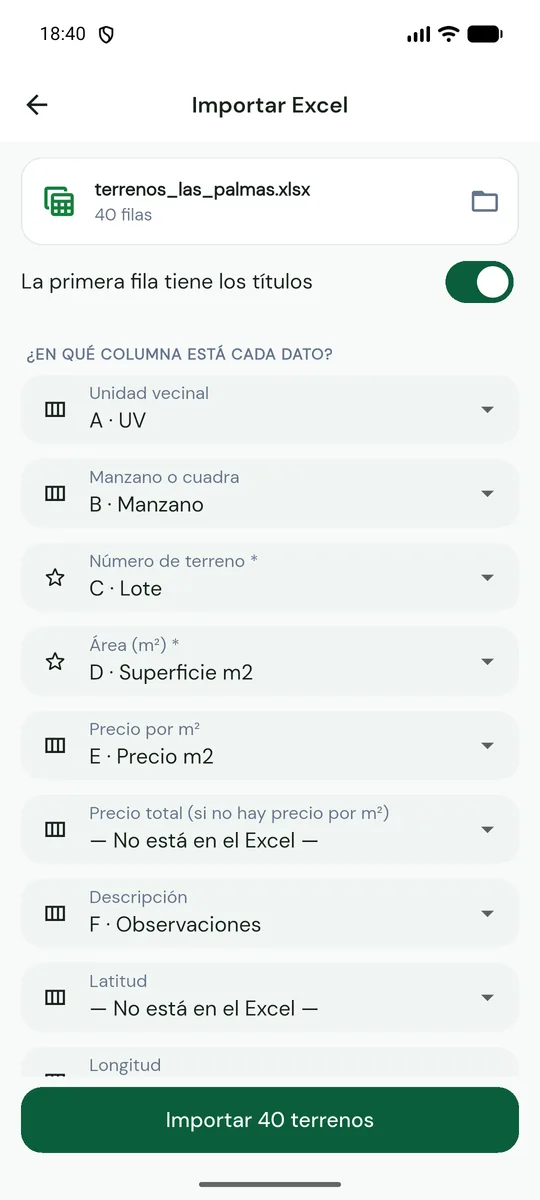
Open your spreadsheet and choose which column holds each field. You see a preview and the rows with problems before importing.

  • Unit, block, number, area, price per m² or total price
  • Description and coordinates (latitude and longitude or "lat, lng")
  • Excel (.xlsx) or CSV with ; , or tab
  • If the same lot already exists, it is updated
Safety

A lot is never sold twice

Everything works offline except one thing: confirming a sale. At that moment the server reserves the lot for that sale and no other phone can sell it.

  1. No signal

    You see the plan, build the payment plan and print the proposal.

  2. With signal

    Tap "Confirm reservation": the lot is locked for your client.

  3. Another seller

    If they try to sell the same lot, the app tells them it was already sold.

Documents

The paperwork does itself

Generated on the phone with the sale data, ready to print or share via WhatsApp or email.

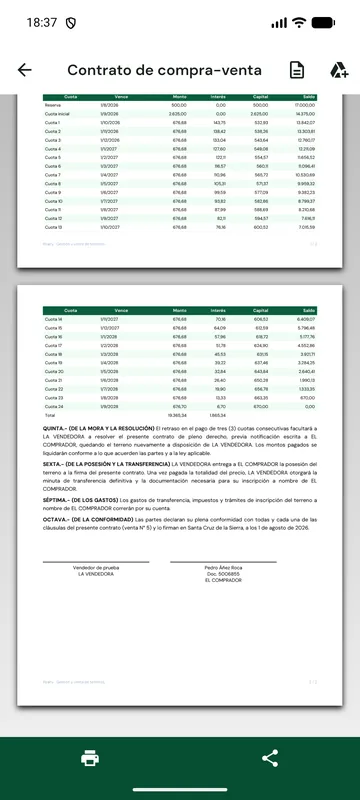
Purchase agreement PDF with the payment plan table
Payment receipt PDF with a QR code
  • Sales proposal

    Price, interest and the full payment plan table.

  • Purchase agreement

    In PDF and Word, with your clauses and every holder.

  • Receipt with QR

    Installments covered, amount in words and balance.

  • Full payment certificate

    When the plan is done, with the total paid and the last payment date.

Take a look

Designed for one-handed use

Real app screens, in light and dark themes.

Home with the summary by status
Project site plan
Project site plan
Satellite map
Satellite map
Sales list
Sales list
Payment plan of a sale
Receipt with QR
Receipt with QR
Dark theme
Dark theme
Site plan in dark theme
Built for the field

It works where your lots are

On the subdivision there is rarely a good signal. Realty keeps everything on the phone and uploads it by itself when the connection is back.

Offline

Site plan, lots, payments and documents work without signal.

Syncs by itself

Every phone in your company sees the same data.

No double sales

Confirming a sale reserves the lot on the server.

Several holders

All of them appear in the agreement and documents.

GPS and satellite

Place each lot while standing on it.

Three languages

Spanish, English and Portuguese, throughout the app.

Light and dark

With Realty's Forest Green palette.

Sign in with Google

No passwords to remember.

Comparison

Better than a notebook and a spreadsheet

Notebook or ExcelRealty
See which lots are freeSearch and ask around On the plan, by color
Avoid selling the same lot twiceDepends on telling each other Controlled by the server
Payment plan with interestFormulas by hand Automatic and editable
Agreement and receiptsCopy and paste into Word Generated automatically
Overdue installmentsCheck row by row Collections list
Working on site without signalPaper, then type it up Everything on the phone

Your subdivision in your pocket

Realty will be on Google Play for Android very soon. Write to us if you want to try it on your project.

Coming soon toGoogle Play Write to us
Frequently asked questions

What people ask us most

Do I need internet to use it?

No. Everything is saved on the phone: viewing the plan, loading lots, recording payments, issuing receipts and agreements. Only confirming a sale needs internet, so a lot is never sold twice.

What happens with my PDF site plan?

You upload it once from the app. It becomes a zoomable map and is downloaded to every phone in your company, so it works without signal.

Can I load my lots from Excel?

Yes. Choose the file and, for each field (neighborhood unit, block, number, area, price, description, coordinates), the column where it is. You see a preview before importing.

How is the payment plan calculated?

With French amortization: the reservation and down payment carry no interest and the balance is split into fixed monthly installments with the annual interest you enter. You can change the date or amount of any installment and the rest is recalculated.

When is the agreement issued?

Once the reservation and down payment are paid. It is generated in PDF and Word with your company's clauses, which you can edit. When the whole plan is paid, the full payment certificate is enabled.

Can there be several holders?

Yes. Add every buyer to the sale and all of them appear in the agreement with their ID.

What does reverting an agreement mean?

If the client stops paying or backs out, you record the date and reason. The sale is kept as reverted and the lot becomes available again.

Where are the attachments stored?

In your own Google Drive, in the "Realty – your name" folder, with a subfolder per sale. The app can only see the files it creates.

Is my data safe?

It is stored on your phone and on our server over an encrypted connection, and only your company sees it. We do not sell or share it. Read the privacy policy (in Spanish).

How do I delete my account?

You can ask anytime. The steps are on Delete my account (in Spanish).